Truck Dash Cams for Long Haul Drivers
Practical dash cam options for long haul drivers, covering front and rear recording, image quality, storage, and installation.

Truck dash cams are a simple idea with a lot of practical reach: a camera that quietly records the road ahead, and sometimes the area behind, so there is a record when something happens. That record can be useful after a close call, a dispute over who did what, or a stretch of road where conditions changed faster than anyone expected. A dash cam won’t prevent an accident, and it doesn’t guarantee a legal or insurance outcome. What it can do is give you footage to review and a clearer picture of the moment.
Not every driver needs the same setup. Some want front-and-rear coverage because the back of the rig matters as much as the front. Others care more about how clean the image looks at night. Some like a touchscreen or voice commands; others just want a small forward-facing camera that stays out of the way. For drivers building out the cab with more than just a camera, our guide to long haul truck cab essentials covers other practical items worth keeping within reach.
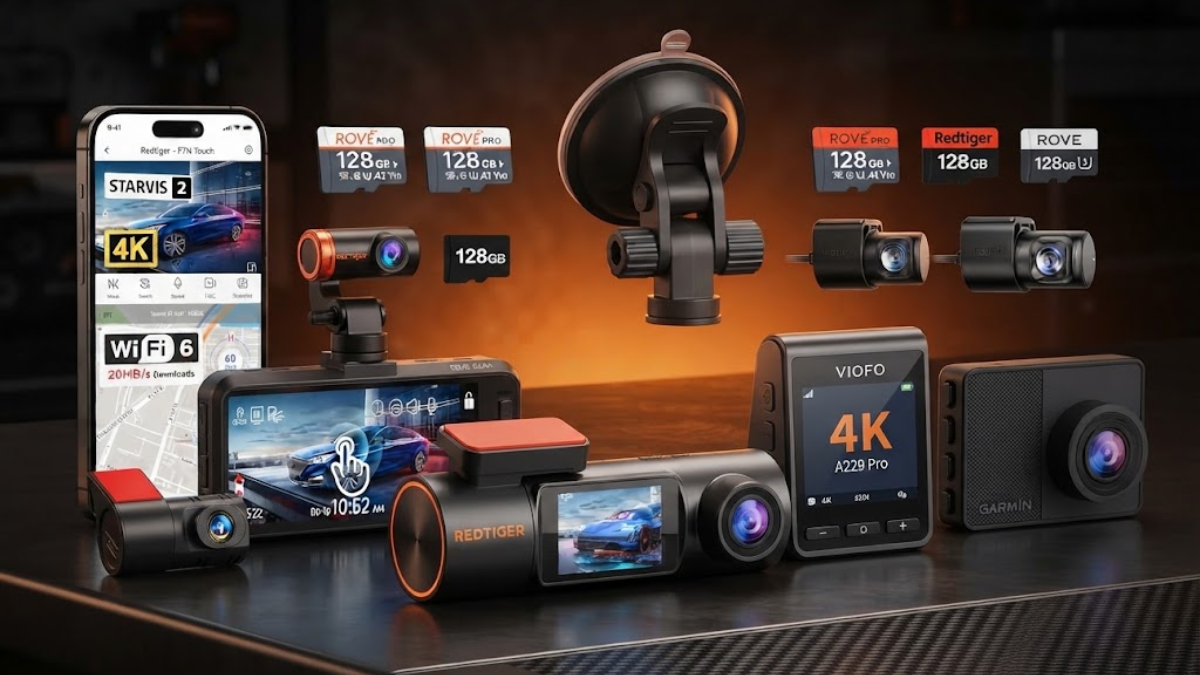
The five cameras below take noticeably different approaches to the same job. The aim here is to show where they differ and what to think through before buying, not to crown a favorite.
Comparison Table
| Product | Coverage | Main Resolution | Notable Feature | Long-Haul Consideration |
|---|---|---|---|---|
| ROVE R2-4K Dual Dash Cam | Front + rear | Front 4K upscaled; rear 1080p | 3-inch IPS display, 5.8GHz Wi-Fi | Rear cable is about 6.5 m; check the route in your tractor-trailer |
| REDTIGER F7NP | Front + rear | Front 4K; rear 1080p | Parking mode, USB-C | No touchscreen or voice control; parking mode needs a hardwire kit |
| REDTIGER F7N Touch | Front + rear | Front 4K; rear 1080p | Touchscreen, voice control, Super Night Vision | Screen interaction suits some cabs better than others |
| VIOFO A229 Pro 2CH | Front + rear | Front 4K; rear 2K | Dual Sony STARVIS 2 sensors, dual-band Wi-Fi, buffered parking mode | Standard rear camera is not the waterproof A229 Pro-W; plan the rear mount carefully |
| Garmin Dash Cam 67W | Front only | 1440p | 180-degree view, magnetic mount, voice control | Compact and simple, but no rear coverage in the box |
Our Take Before You Buy
Resolution is the number everyone looks at first, and it’s probably the least useful way to start. A sharp 4K spec sheet doesn’t help much if the camera washes out headlights at night, struggles with a low sun through the windshield, or sits at an angle that cuts off half the lane. Sensor quality and HDR handling often matter more than the pixel count, because they decide whether a license plate, a lane marking, or a dark stretch of shoulder is readable when you play the footage back.
The bigger decision is front-only or front-and-rear. A front-only camera is simpler, cheaper to install, and easier to move between vehicles. A dual-channel setup records more, but the rear camera needs somewhere to go, and in a tractor-trailer that is rarely a trivial question. Many rear cameras are designed to sit inside a vehicle and look through the back glass. That works well in a car. In a sleeper cab it may only show the inside of the cab or the sleeper wall, and getting a cable all the way to the back of a trailer is a different project altogether. Cable length, routing along the roofline, and whether the rear camera is built for interior or exterior mounting all deserve attention before you commit. A dash cam is only one part of setting up a truck properly, so our guide to choosing the right accessories for a long-haul truck looks at the equipment and add-ons that can make installation and daily use easier.
Power is the other installation detail that catches people out. Plugging into a cigarette-lighter socket is the easy route, but it leaves a visible cable and doesn’t help with recording while parked. Parking mode generally depends on a constant power feed, which usually means a hardwire kit and some comfort with your truck’s fuse panel, or a professional install. And not every truck has the same connector, the same fuse layout, or the same amount of usable windshield. Measure the space and check the power situation before assuming anything fits.
Heat deserves a mention too. A cab parked in summer sun can get punishing, which is one reason cameras with a supercapacitor rather than a conventional battery are common in this category. All five cameras here use that approach or something close to it, but it’s still worth keeping the lens out of direct baking sunlight when you can.
Storage and convenience round out the list. Higher-resolution recording fills a card quickly, and loop recording overwrites older footage, so the question is how long you want files to survive before they’re replaced. Wi-Fi and a phone app make it easier to pull a clip without removing the card, though some drivers find that more fiddly than a plain card reader. Finally, a camera can fit naturally into a broader roadside setup. Our guide to roadside emergency gear worth keeping in a long haul truck covers other equipment that can be useful when a routine trip takes an unexpected turn.
ROVE R2-4K Dual Dash Cam

- UPSCALED 4K FRONT + 1080P REAR DUAL DASH CAM: The ROVE R2-4K DUAL records the road ahead and behind at the same time. Th…
- SONY STARVIS 2 IMX675 SENSOR + SUPER NIGHT VISION: The front camera uses a Sony STARVIS 2 IMX675 5MP image sensor with a…
- ULTRA FAST 5.8GHz WIFI/ UP TO 20MB/s DOWNLOAD SPEED: With its built-in dual-band 5.8GHz and 2.4GHz WiFi, you can use the…
The ROVE is a straightforward front-and-rear system. The listing describes the front output as 4K upscaled, so it’s worth treating the front image as high-resolution output rather than native 4K capture. The rear camera records at 1080p. Both sit on Sony STARVIS 2 imaging with HDR, which is aimed at handling the contrast between bright skies and dark road surfaces.
What stands out is how complete the package is. A 3-inch IPS display gives you a reasonable view for aiming the camera and checking playback without reaching for your phone, and built-in GPS adds location data to recordings. The ROVE app connects over 5.8GHz Wi-Fi, a G-sensor flags impact events, and a supercapacitor handles power. The referenced package also includes a 128GB card, with support for cards up to 512GB if you later want more headroom.
The practical question is the rear camera cable, which is roughly 6.5 meters in the referenced package. In a passenger vehicle that’s generous. In a tractor-trailer it is a measured length with a very specific job: reaching from the windshield to wherever the rear camera sits. If that means the sleeper’s back wall or rear window, it may be plenty. If you were hoping to reach the trailer, it almost certainly won’t be, and you shouldn’t assume the included cable fits your rig. Run a tape measure along the actual route you’d use before deciding.
Read this one as a practical example of the front-and-rear approach: broad coverage in a single kit, with the installation depending heavily on your cab.
REDTIGER F7NP

- [4K+1080P Front & Rear Recording] REDTIGER F7NP dash cam captures every detail with stunning 4K front and 1080P rear vid…
- [STARVIS 2 Sensor & WDR Night Vision] Equipped with the advanced STARVIS 2 sensor, F1.5 large aperture, and 6-layer opti…
- [Built-in 5.8GHz WiFi & Smart App] Connect your smartphone to the dashcam’s built-in 5.8GHz WiFi to enjoy ultra-fast dow…
The F7NP covers the front and rear, with a 4K front camera and a 1080p rear camera. Its Sony STARVIS 2 sensors pair with an F1.5 front aperture, which lets in more light, and HDR/WDR processing to keep bright and dark areas readable together. The front lens has a 170-degree viewing angle and the rear is 140 degrees, so the front camera takes in a wide slice of the lanes beside you as well as the road ahead.
The point worth understanding with this model is what it leaves out. The F7NP has no touchscreen and no voice control. You work it through physical buttons and the REDTIGER app over 5.8GHz Wi-Fi, which the product description says can move files at up to 20MB/s. For some drivers that’s a plus: fewer on-screen menus, fewer ways to accidentally change a setting while rolling. For others it means picking up the phone more often.
It does include parking mode, though that requires a hardwire kit, which is an extra purchase and an installation step. Built-in GPS, a G-sensor, loop recording, and a supercapacitor are all part of the package, and the USB-C connection is a small convenience. The microSD slot supports cards up to 512GB per the current manufacturer information.
For a driver who wants dual coverage and parking capability without paying for a touch interface, this is the camera that fits that description. The tradeoffs are the same as with any rear camera: the mounting position and the cable run still have to work in your truck.
REDTIGER F7N Touch
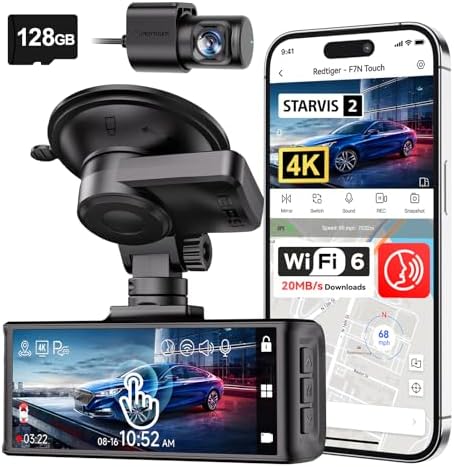
- [4K+1080P Dual Recording] REDTIGER F7N TOUCH captures your drive journey in stunning 4K UHD resolution with STARVIS 2 se…
- [Voice Control & Touch Screen] F7NTOUCH dashcam features voice commands, allowing for hands-free control of your 4K car …
- [Built-in GPS & 5.8GHz WiFi] Both Android and IOS users can connect to dashcam WiFi via the REDTIGER Cam app. Although t…
On paper the F7N Touch looks like a close relative of the F7NP, and in several ways it is: a 4K front camera, a 1080p rear camera, Sony STARVIS 2 sensors, a 170-degree front view and a 140-degree rear view. The difference is how you deal with it every day. This model adds an approximately 3.18-inch touchscreen and voice control, and it lists Super Night Vision alongside HDR/WDR.
That changes the feel of using it inside the cab. A touchscreen lets you adjust settings, review a clip, or check the frame directly on the unit, without pairing a phone. It also means more of the camera’s behavior is a tap away, which is convenient when you’re parked and looking at footage, and less appealing if you’d rather not have a screen to smudge or accidentally brush. Voice control can be handy for actions like saving a clip, though how reliable it feels depends on cab noise, engine rumble, and your own preferences. Neither feature makes the camera any safer to use, and anything that takes your attention should wait until the truck is stopped.
Underneath, the shared hardware is the same family: built-in GPS, 5.8GHz Wi-Fi with transfer speeds up to 20MB/s per the product description, the REDTIGER app, a G-sensor, loop recording, parking mode, and a supercapacitor. The referenced Amazon listing includes a 128GB card.
The choice between this and the F7NP isn’t about one being better. It’s about whether you want direct, on-camera interaction or a leaner unit you manage mostly through buttons and the app.
VIOFO A229 Pro 2CH

- 【4K +2K Dual STARVIS 2 Sensors Dash Cam】 The pioneering A229 Pro dash cam is equipped with dual flagship STARVIS 2 image…
- 【HDR for Front and Rear Night Vision 2.0】 The A229 Pro boasts STARVIS 2 MX678 and IMX675 sensors, expertly combined with…
- 【3 Parking Modes for 24/7 Protection】 A229 Pro is supported by a buffering function, it will initiate automatic recordin…
This is the most detail-oriented camera of the five, and it’s worth understanding why those details matter when you’re reviewing footage rather than just reading a spec sheet.
The front camera uses a Sony STARVIS 2 IMX678 8MP sensor and records 4K. The rear uses an IMX675 5MP sensor at 2K. A larger, more sensitive sensor gathers more light, which is what helps in low-light driving, when headlights, taillights, and dark pavement all compete in the same frame. HDR on both cameras helps balance that contrast, so a bright light source doesn’t swallow the details around it. Higher resolution matters mainly when you need to zoom in afterward, for instance to read a sign, a plate, or a lane marking in a still frame. The front lens has an F1.8 aperture and a 140-degree field of view; the rear is F1.9 with 160 degrees. A narrower front view than some competitors trades a bit of side coverage for more detail straight ahead.
On the practical side, dual-band 2.4GHz and 5GHz Wi-Fi plus Bluetooth make connecting to your phone more flexible, and built-in GPS, a G-sensor, voice control, and loop recording are standard. Parking options are broader than most: buffered parking mode, plus time-lapse and low-bitrate modes that stretch storage during long stops. It supports microSD cards up to 512GB, uses a supercapacitor instead of a traditional battery, has a 2.4-inch display, and charges over USB Type-C.
Now the truck-specific limitation, and it matters. The Amazon listing covered here is the standard A229 Pro 2CH, not the A229 Pro-W. The standard rear camera is not a purpose-built waterproof exterior trailer camera. It ships with a rear cable of about 6 meters. VIOFO sells a separate A229 Pro-W line with waterproof rear-camera options and longer cable choices aimed at larger and commercial vehicles. If you want the rear camera outside the trailer or in a spot exposed to weather, the standard version takes more planning, and it shouldn’t be assumed to suit every tractor-trailer setup. Inside a sleeper looking back, it may be a different story.
Garmin Dash Cam 67W

- Pocket-sized dash camera goes virtually unnoticed on your windshield; automatically records and saves video of incidents…
- Extra-wide 180-degree lens captures more of the environment, and records 1440p HD video with Garmin Clarity HDR optics f…
- Voice control (only available in English, German, French, Spanish, Italian and Swedish) lets you use spoken commands to …
The Garmin 67W makes a different argument from the other four: do one thing, keep it small, and keep installation simple. It’s a front-facing camera only. There is no rear camera in the box, so it won’t record behind the cab unless you add another camera separately.
What you get is a compact unit recording at 1440p with a 180-degree field of view, which is wide enough to capture a lot of the lane context on either side of the truck. It has a roughly 2-inch display, built-in GPS, a G-sensor for incident detection, and voice control. A magnetic mount makes it easy to take down or reposition, which appeals to drivers who share a truck, swap between tractors, or just don’t want a camera left in view at a truck stop.
It connects through the Garmin Drive app over Wi-Fi, supports microSD cards up to 512GB, and offers Parking Guard for recording while parked. As with other cameras, parking features generally depend on a power source that stays live, so check what your install will look like. The 67W can also sync footage automatically with compatible Garmin cameras. Some Garmin connected and cloud features, such as Vault, may require a subscription, so look at what’s included before assuming anything beyond local recording is free.
The trade-off is clear. There’s less to route, mount, and troubleshoot, but also less coverage. For a driver whose main concern is the road ahead and who doesn’t want to string a cable down the length of the rig, that can be a sensible compromise.
Final Thoughts
Picking a dash cam for a truck comes down to a handful of trade-offs rather than a single spec. The first is coverage. A front-only camera is simpler and easier to install, while a front-and-rear system gives you more to review but asks more of your cab layout. The rear camera is where tractor-trailers get complicated: cable length, routing, and whether the camera is meant to sit inside or outside all decide whether a given kit works for your truck. None of the cables included with these cameras should be assumed long enough to reach the trailer, and a standard rear camera isn’t automatically built for exterior mounting.
Image quality is the second consideration, and it’s worth weighing against real conditions: night driving, glare, and how clearly you’d need to read details afterward. After that come storage and how long you want recordings to last, the controls you prefer (buttons, touchscreen, voice, or app), and whether parking mode matters to you at all. If it does, plan for a hardwire kit or a professional install, and expect a bit more complexity.
The right choice depends on how you actually use the truck: solo or team, one tractor or several, mostly interstate or a lot of overnight parking. If you’re also thinking through what else belongs in the cab, our guide to long haul truck cab essentials is a good companion to this one. Measure first, decide what you really need to record, and pick the setup that fits your rig rather than the one with the biggest number on the box.
FAQ
Is a dash cam worth having in a long-haul truck?
For many drivers, it can be. A dash cam gives you a record of the road ahead that you can review after an incident or a close call, and it can help document what happened. It doesn’t prevent accidents or guarantee any legal or insurance result, so the value depends on whether that kind of record matters to you and how you drive.
Do I need a front-and-rear dash cam?
Not necessarily. A front-only camera covers the view most drivers care about and is easier to install. A front-and-rear system adds coverage behind you, but the rear camera needs a workable mounting spot and a long enough cable. In a tractor-trailer, that often means thinking carefully about where the rear camera will go and how its cable will run.
Can a regular car dash cam work in a semi-truck?
Often it can, particularly for forward-facing recording, since the camera simply sits on the windshield and records the road. The complications come with the rear camera, a long cable run, available windshield space, and power connections that may differ from a car’s. Check the mount and power requirements against your cab before buying.
Does parking mode require hardwiring?
Usually. Parking features typically depend on a power source that stays live when the engine is off, and that commonly means a hardwire kit. Some models list the kit as a separate accessory, so confirm what’s included and whether you’re comfortable with the install, or whether a professional should handle it.
How much storage is useful for long trips?
It depends on the camera’s resolution and how many channels it records. 4K, dual-channel recording fills a card faster than a single 1440p stream, and loop recording overwrites older files when the card is full. Larger cards give you more time before footage is replaced. Most of these cameras support up to 512GB, and a card rated for continuous recording is worth choosing. If you want to keep specific clips, save them or copy them off the card after an incident rather than relying on loop recording to preserve them.